
Using Next.Js to build Orcasound Content Site
August 6, 2021
Next.js is a React Framework that works as a Static Site Generator, and one of my goals for this summer was to build Orcasound’s new content site using Next.js. Since Orcasound is an open-source community, this framework is akin to the current WordPress site (both are open source software). However, in order for people to contribute to the current content site they need to be assigned a role by the admins since WordPress organizes its content with MySQL database. This requires administrative effort and means it isn’t as easy as we’d like for anyone to contribute content — which is one of the reasons we are migrating.
Currently, the Next.js content site allows anyone to edit its content by forking the open source repository and then submitting a pull request. (Here is the orcahome repo if anyone wishes to contribute!) All they need is a Github account.
Interestingly enough, Next.js fights more battles than I initially thought. The tech stack provides static generation of sites (often for blogs and other static content), and also server-side rendering (SSR). (Even a hybrid approach is definitely possible.) It did take me around a week to get everything started; having learned how to code projects in React made the process a lot simpler (and in my opinion, Next.js is a lot faster than React). However, not everything went smoothly.
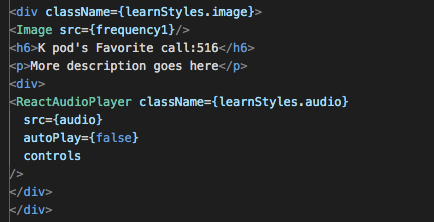
Next.js has some issues with image customization, and they even address it on their Github in the discussion section. Basically, you cannot directly customize an image; instead, you need to create a div and wrap an image inside that div in order to style the image properly. This can be tedious, especially when you are just starting, but as new versions of Next.js roll out I’m sure this ‘issue’ will be fixed soon.
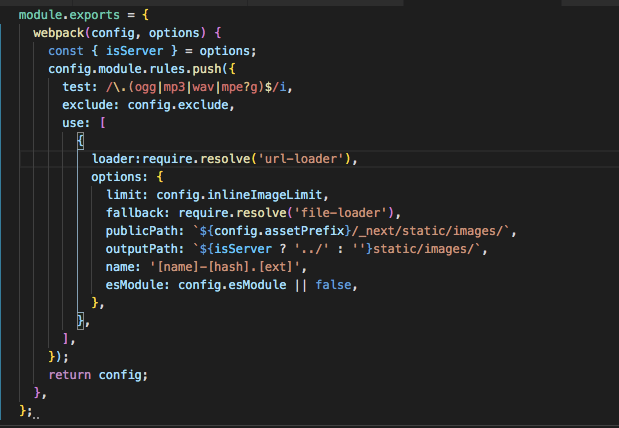
Another challenge I had was with embedding audio. To solve this problem you will need to install Webpack as a dependency, and in your next-config.js you’ll have to specify the type of content you want your site to render in your next-config.js file.
I also used a React library for audio (react-audio-player), since Next.js doesn’t have one built-in and their documentation regarding audio is pretty minimal. Besides that, it is a great framework that allows for a fast build.
After the code was built, it was time to create my first pull request. Being new to the open-source community, this was certainly intimidating. I was afraid I was going to break something, but it was a pretty straight-forward process. Now that I know how to do that, I will try to limit my pull requests to smaller or single features, since mine was basically all of the code I had written so far this summer! One of my mentors, Paul, shared a great article with me about this subject which helped me understand better how to create a PR and write clear documentation.
I managed to build the website and make it seem as similar as possible to the Figma mockups, and I believe Next.js has really simplified things for me. I’m glad I could use this framework, which is relatively new to me, and I’m glad to be able to build content for Orcasound using this tech stack.
Last but not least, Shout to Scott, Brendan, Paul, and all of the other GSoC and Orcasound members – everyone has been incredibly kind and always willing to give a helping hand during this entire process. As summer comes to an end, I’m glad that this project of mine is turning out well and it’s looking closer and closer to the original wireframes. I’m excited to keep developing and collaborating with Orcasound!